
Have you ever wondered if your Tesla windshield wipers switch on all by themselves when the rain starts? If you’re driving a Tesla, you might have noticed the wipers kicking in without you lifting a finger—and sometimes even when the road is dry.
Understanding how and why Tesla’s windshield wipers turn on automatically can save you from those unexpected moments and help you get the most out of your car’s smart features. Keep reading to discover how Tesla’s unique system works, why it sometimes surprises drivers, and how you can take control of your wipers for a smoother, hassle-free drive.
Tesla Auto Wipers Feature
Tesla’s Auto Wipers feature adds convenience by managing windshield wipers automatically. This system detects rain and adjusts the wiper speed without driver input. It aims to improve safety by keeping the windshield clear in changing weather. Tesla uses advanced sensors and cameras instead of traditional rain sensors.
The technology is designed to activate the wipers when needed and stop when rain stops. It helps drivers focus more on the road and less on adjusting wipers manually. Tesla continues to improve this feature through software updates and feedback.
How Auto Wipers Work
Tesla’s Auto Wipers use sensors to detect water on the windshield. The system measures the amount and intensity of rain. It then adjusts the wiper speed to clear the glass effectively. The feature can turn the wipers on or off automatically based on rain conditions. This makes driving safer during sudden rain showers.
Role Of Front Cameras
The front cameras play a key role in detecting rain and debris. They analyze the windshield surface for water drops and dirt. These cameras send data to the car’s computer to decide wiper action. Unlike traditional rain sensors, cameras can sometimes misinterpret reflections or dust. This can cause the wipers to activate unexpectedly in dry conditions.
Beta Status Of Auto Wipers
The Auto Wipers feature is still in beta testing. Tesla is collecting user feedback to improve accuracy and reliability. Beta status means occasional glitches or false activations may happen. Updates aim to reduce these errors and improve overall performance. Drivers can manually override the system if needed during this phase.
Reasons For Random Activation
Tesla windshield wipers sometimes turn on by themselves without rain. This can confuse many drivers. Understanding why this happens helps you manage the system better. Several factors trigger the wipers unexpectedly. These include dirt, camera issues, and environmental changes.
The system uses cameras and sensors to detect moisture on the windshield. But these sensors can react to other things too. Let’s explore the main reasons for random activation.
Effect Of Dirt And Debris
Dirt or debris on the windshield can trick the sensors. Spots of mud, dust, or insect marks may look like water drops. The system thinks the glass is wet and starts the wipers. Keeping the windshield clean reduces false activation.
Also, dirt on the wiper blades can cause smearing. This makes the sensors detect false moisture. Regular cleaning of both the windshield and wipers helps prevent random wipes.
Camera Lens Interference
Tesla uses front cameras to control the wipers. These cameras monitor the windshield for rain. Any obstruction on the lens can confuse the system. Dirt, water spots, or glare on the camera lens may trigger the wipers.
Bright sunlight or reflections can create false signals. The cameras may interpret these as rain droplets. Keeping the camera area clean and clear reduces this problem.
Environmental Triggers
Changes in light and weather can cause random wiper activation. Sudden shadows, fog, or mist can look like rain to the sensors. Road spray or dust clouds also affect the system.
Sometimes, temperature changes cause condensation on the windshield. This moisture can activate the wipers. Tesla’s system tries to keep the windshield clear, even if there is no real rain.
Manual Wiper Controls
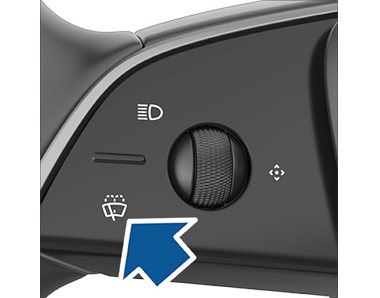
Manual wiper controls in a Tesla allow drivers to operate the windshield wipers without relying on automatic settings. These controls provide simple and direct ways to clear the windshield. Understanding how to use them helps keep visibility clear during different weather conditions.
Using The Turn Signal Stalk
The turn signal stalk on a Tesla controls the wipers manually. Pressing it lightly causes the wipers to swipe once. Pressing it more fully turns the wipers on continuously. This method gives quick control without needing to use the touchscreen.
Adjusting Wiper Speeds
Wiper speed adjusts by pressing the same stalk button multiple times. Each press cycles through slow, medium, and fast speeds. This lets drivers choose the speed that fits the rain intensity. It’s easy to change speeds on the go for better visibility.
Spraying Washer Fluid
To spray washer fluid, press the button at the stalk’s end firmly. The wipers swipe automatically while spraying the fluid. This cleans the windshield and removes dirt or debris. Using washer fluid with manual control keeps the glass clear during driving.
Autopilot And Wipers
Tesla vehicles use advanced systems to manage windshield wipers during driving. The Autopilot feature interacts with the wiper settings to improve safety and convenience. Understanding how wipers behave with Autopilot helps drivers stay comfortable and focused.
Auto Setting During Autopilot
When Autopilot is activated, Tesla sets the windshield wipers to Auto mode automatically. This mode uses cameras to detect rain or moisture on the windshield. The wipers adjust their speed based on the amount of water detected. This helps keep the windshield clear without driver input.
Overriding Auto Mode
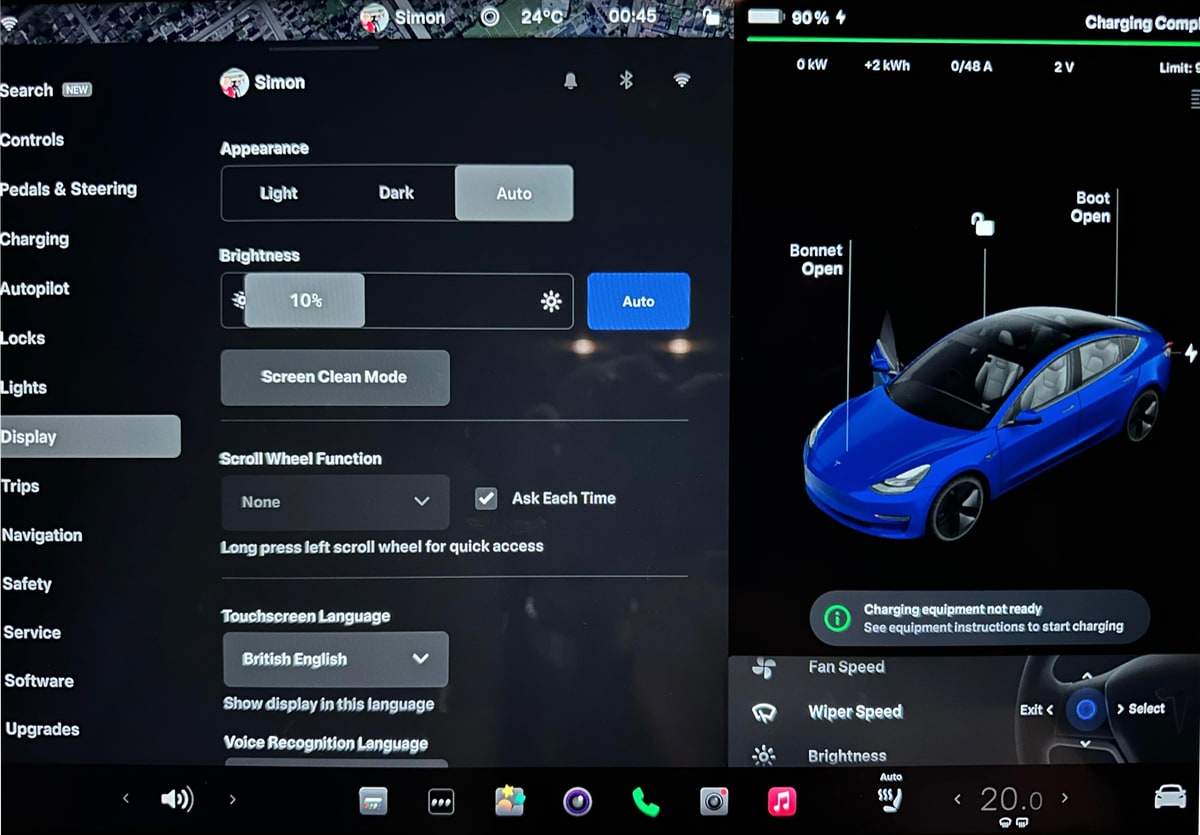
Drivers can override the Auto wiper setting during Autopilot. Changing the wiper speed manually is possible through the control stalk or touchscreen. However, the system will return to Auto mode the next time Autopilot is engaged. This ensures consistent wiper behavior during assisted driving.
Default Behavior When Engaging Autopilot
Each time Autopilot starts, the wipers switch back to Auto mode by default. This behavior helps Tesla maintain safe visibility in changing weather. Even if the driver changed the wiper setting before, it resets for better automation. The Auto mode is still in beta and may improve over time.
Tips To Manage Auto Wipers
Managing Tesla’s auto windshield wipers helps improve driving comfort. The system uses cameras to detect rain and activate wipers automatically. Sometimes, auto wipers may behave unexpectedly. Simple steps can help control and optimize their function.
Cleaning Camera Housing
Keep the front camera housing clean for accurate rain detection. Dirt, dust, or water spots can confuse the sensors. Gently wipe the camera area with a soft cloth regularly. Avoid harsh chemicals that may damage the lens cover. Clear visibility helps reduce false wiper activation.
Disabling Auto Wipers
Turn off auto wipers through your Tesla’s touchscreen settings. Navigate to the wiper controls and select manual mode. This prevents the system from switching on wipers automatically. Use manual control during light rain or when auto mode acts up. Remember to switch back to auto for convenience in heavy rain.
Preventing Random Activation
Random wiper activation happens due to camera glare or reflections. Park your Tesla where sunlight does not directly hit the camera. Avoid parking near bright lights or reflective surfaces at night. Check for bugs or smudges on the windshield in front of the camera. These measures help reduce unwanted wiper movements.

Common User Experiences
Tesla windshield wipers often surprise many drivers with their automatic behavior. Users report various experiences with the auto wiper system. These experiences help understand how the system works and its quirks. Below are some common user reports that highlight typical scenarios.
Wipers Turning On Without Rain
Many Tesla owners notice the wipers activating even when it is dry outside. The system uses cameras, not traditional rain sensors. These cameras detect moisture, but can also mistake dirt or shadows for rain. This leads to wipers turning on unexpectedly. Some users find this annoying during sunny days or in dusty conditions.
Frequent Activation In Same Location
Drivers often observe their wipers turning on repeatedly at specific places. This happens near areas with reflections or glare on the windshield. The camera may read these reflections as raindrops. Parking under trees or near reflective buildings can trigger this effect. The wipers keep activating until the car moves away from that spot.
Community Solutions And Workarounds
Tesla owners share tips to reduce unwanted wiper activity. Some suggest cleaning the windshield and cameras often to avoid false triggers. Others recommend switching wipers off manually when parked in tricky spots. Software updates from Tesla sometimes improve the system’s accuracy. Online forums provide helpful advice from experienced users facing the same issues.
Conclusion
Tesla windshield wipers can turn on automatically using their camera system. This system detects rain and adjusts wiper speed. Sometimes, debris or glare may cause false triggers. You can always switch wipers from Auto to manual if needed. Understanding this helps improve your driving experience.
Keep your windshield and camera clean for best performance. Automatic wipers add convenience, but knowing how they work matters. Stay safe and enjoy your Tesla’s smart features.