
If you own a Ford F150, you might need to back up a trailer sometimes. This can be hard for many drivers. But Ford F150 has a special feature called Pro Trailer Backup Assist™. It helps you back up trailers easier and safer. In this article, we will explain how to use trailer backup on Ford F150. We will keep the steps simple and clear.
What Is Pro Trailer Backup Assist™?
Pro Trailer Backup Assist™ is a tool made by Ford. It helps drivers turn the steering wheel when backing up a trailer. Instead of turning the steering wheel yourself, you just turn a knob. The truck does the rest. This makes backing up with a trailer less stressful.
This feature works with many types of trailers. It is good for people who do not drive trailers often. It also helps experienced drivers save time and avoid mistakes.
Before You Start: Things to Know
- Make sure your trailer is properly connected to your Ford F150.
- Your trailer should have a sticker that the rear view camera can see.
- Turn on your truck and put it in park.
- Check that your truck has Pro Trailer Backup Assist™. Not all models have it.
Step 1: Set Up Your Trailer Profile
You need to create a profile for your trailer. This tells your truck the size and shape of your trailer. Follow these steps:
- Press the “Settings” button on your truck’s touchscreen.
- Select “Trailer Backup Assist” option.
- Choose “Create New Trailer Profile.”
- Enter the trailer’s length and width.
- Attach the special sticker on the trailer’s rear. This helps the camera see it.
- Save the profile.
Now your truck knows your trailer. This helps it steer correctly.
Credit: www.wendlefordsales.com
Step 2: Connect Your Trailer
Before you back up, connect the trailer to your truck. This means attaching the trailer hitch and plugging in the electrical cables. Check that the lights on the trailer work. This is important for safety.
Step 3: Activate Trailer Backup Assist™
Follow these easy steps to turn on the system:
- Shift your truck into reverse gear.
- Look at the touchscreen. You will see a message about trailer backup.
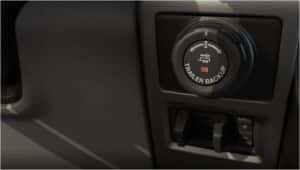
- Turn the Pro Trailer Backup Assist™ knob located near the steering wheel.
The system will now help you steer the trailer as you move backward.
Step 4: Back Up the Trailer
Now comes the fun part. To back up the trailer:
- Use the knob to turn left or right. The truck will turn the wheels for you.
- Watch the screen carefully. It shows a camera view behind your truck.
- Go slow and steady. Do not hurry.
- If you need to stop, just press the brake.
The system makes small steering adjustments. This helps you keep the trailer on the right path.

Credit: www.youtube.com
Tips for Better Trailer Backing
- Practice in an empty parking lot first.
- Keep your hands on the knob, not the steering wheel.
- Go very slow when backing up.
- Use your mirrors and the camera screen together.
- If the trailer moves too fast, slow down.
- Keep the trailer sticker clean and visible.
- Don’t forget to turn off the system when done.
How to Turn Off Pro Trailer Backup Assist™
When you finish, turn off the system. To do this:
- Shift your truck back to park or drive.
- Press the Pro Trailer Backup Assist™ knob or button again.
- The screen will stop showing the trailer backup view.
Using Tow/Haul Mode With Trailer Backup
Ford F150 also has a Tow/Haul mode. This helps when you tow heavy trailers. It changes how the truck shifts gears. This makes driving easier on hills and stops.
To use Tow/Haul mode:
- Find the Tow/Haul button on the dashboard or gear shifter.
- Press the button to activate Tow/Haul mode.
- The dashboard will show a light to confirm it is on.
- Press the button again to turn it off.
Use Tow/Haul mode when:
- You are driving uphill or downhill with a trailer.
- You are driving in stop-and-go traffic.
- You are towing heavy loads for a long time.
Benefits of Using Trailer Backup Assist™
| Benefit | Why It Helps |
|---|---|
| Easy Steering | You turn a knob, not the wheel, to steer the trailer. |
| Less Stress | The system helps avoid mistakes when backing up. |
| Better Control | It makes small adjustments for smooth backing. |
| Safe Parking | You can park trailers in tight spots more easily. |
| Time Saver | Less trial and error when backing trailers. |
Common Mistakes to Avoid
- Not setting up the trailer profile first.
- Ignoring the trailer sticker or camera view.
- Turning the steering wheel instead of the knob.
- Backing up too fast.
- Not using Tow/Haul mode when needed.
- Not practicing before towing.
Summary
Using the trailer backup feature on a Ford F150 is simple. First, set up your trailer profile with the right size. Then, connect the trailer and shift into reverse. Turn the Pro Trailer Backup Assist™ knob to steer. Go slow and watch the screen. Use Tow/Haul mode for heavy towing or hills. Practice often to feel confident.
This system helps make trailer backing easier, safer, and less stressful. It is a smart helper for Ford F150 drivers. Try it next time you tow a trailer. It will save time and effort.